JavaScript Prompt Dialog Box
 JavaScript FAQ |
JavaScript Dialogs FAQ
JavaScript FAQ |
JavaScript Dialogs FAQ
|
Question: How do I display a user prompt from JavaScript?
Answer: To display a user prompt dialog, use the JavaScript prompt() method:
prompt(PromptText,SuggestedInput)NOTE: If a prompt dialog like the one pictured below does not show up, you may need to adjust your browser's security settings. (See Security concerns below.) The actual appearance of the prompt dialog depends on your browser and OS. Here is an example from Firefox 3.5 under Windows (with Windows Classic UI theme):
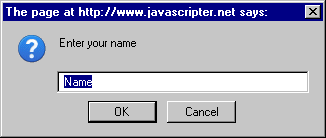
The Try it now button above was created using this code:
<form name=myform>
<input type=button value="Try it now"
onClick="
  s=prompt('Enter your name','Name');
  alert('Hello '+s+'!')">
</form>
Returned Value:
The value returned by prompt depends on what exactly the user does with the dialog.
If the user types something and then clicks OK or presses Enter, the prompt method returns the user input string.
If the user clicks OK or presses Enter without typing anything into the prompt dialog, the method returns
the suggested input, as specified in the second argument passed to prompt.
If the user dismisses the dialog (e.g. by clicking Cancel or pressing Esc), then in most browsers the prompt method
returns null.
Security Concerns:
Internet Explorer 7.0 and newer versions may be configured to block the JavaScript prompt dialogs for security reasons.
When the prompt method is invoked, the user is presented with an information bar with the following text:
This website is using a scripted window to ask you for information. If you trust this website, click here to allow scripted windows (IE7), or
To protect your security, Internet Explorer has restricted this site from showing certain content. Click here for options (IE8).
See also other JavaScript dialogs: